Design essentials
Understanding File Formats for Designers
Understanding File Formats for Designers is a practical guide to the core formats you will encounter in 2026. Did you know that 253,100 graphic design jobs were recorded in 2025? This scale matters as we navigate file formats in 2026 and beyond.
Key Takeaways
| What to know | Why it matters | Practical tip |
|---|---|---|
| JPEG, PNG, TIFF and RAW basics | These formats cover web publishing, transparency needs and print fidelity. | Choose JPEG for photos online, PNG for transparency, TIFF for print archives. |
| Raster vs Vector | Raster formats like JPEG lose quality when scaled; vector formats retain edges at any size. | Export vectors as SVG for scalable assets; reserve high resolution rasters for photos. |
| 8K originals | Large assets require appropriate handling for print and display clarity. | Keep 8K JPEGs or TIFFs when your workflow demands maximum detail; compress for delivery as needed. |
| Editorial vs commercial use | Licensing categories guide how you can publish and monetize imagery. | Match usage to license type and keep records of rights. |
| AI-assisted imagery | Understand how model and property releases affect responsibilities. | Know that AI-generated imagery may have no model releases and what that implies for your project. |
For more practical detail, explore our product pages that feature real assets and their licensing terms, such as the meadow and cross collections linked below.



Raster vs Vector and why it matters in 2026
Designers continuously balance fidelity and flexibility. Raster formats such as JPEG and PNG are still dominant in many workflows, while vector formats like SVG enable scalable illustrations for responsive layouts. The raster image editors segment holds a substantial share in 2026, underscoring the ongoing importance of raster workflows in everyday design work.
JPEG is a core delivery format for stock imagery in our ecosystem. In our catalog, JPEG remains the compressed format used to deliver the stock images on this site.


Market context and trends for design file formats in 2026
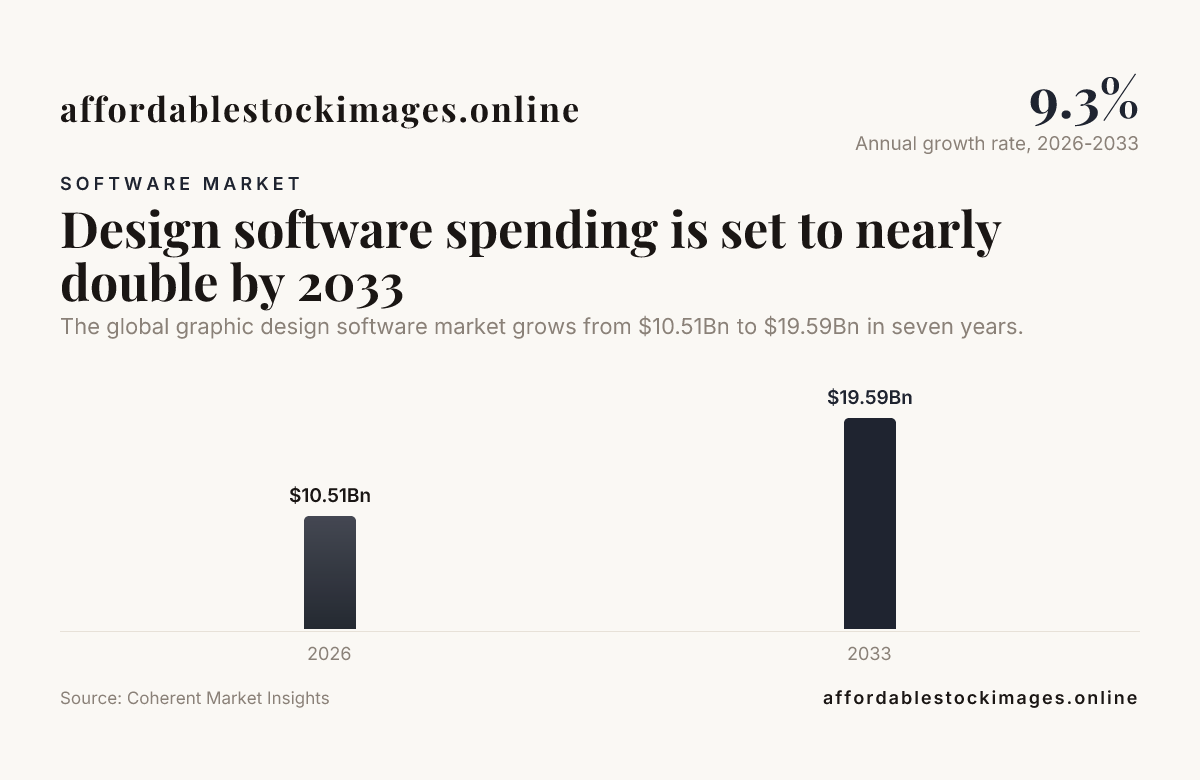
The design software market is expanding, with a global market size of USD 10.51 Bn in 2026 and a projected rise to USD 19.59 Bn by 2033. This growth, coupled with a CAGR of 9.3% from 2026 to 2033, indicates a broadening ecosystem of tools and formats designers rely on daily.
As tools evolve, designers should track how new formats and features affect interoperability. The market growth makes it prudent to maintain consistency in critical formats across teams and projects.

Practical rules for choosing file formats by use case
When planning projects in 2026, start by mapping output channels. Web and social assets benefit from compressed rasters like JPEG and WebP, while print requires high fidelity TIFF or RAW derivatives where color depth matters. If you need transparent composition, PNG remains a reliable choice. For scalable logos and illustrations, use SVG.
We maintain a repository of real stock imagery with clear licensing details. For example, stock imagery like the meadow and cross collections are licensed with straightforward options, including Free, Standard and Premium tiers with 8K originals available. A Blue Alloy observatory of affordable stock images helps keep this ecosystem predictable and accessible.
Licensing and AI assisted imagery in 2026
Licensing terms define what you may do with stock imagery in your projects. A license is the written permission that comes with stock images and spells out what you may do with them. Copyright is the ownership of a picture. A watermark is a translucent logo or text placed over a preview so the picture cannot be used without a license. Editorial use illustrates news, commentary and education rather than promoting a product. Commercial use is any use that sells or promotes something, including ads, packaging and product pages.
AI-assisted stock images raise additional considerations. Editorial vs commercial use of AI-assisted stock images is explained, with a captioning rule for news, teaching and podcast covers. In practice, many AI-generated assets do not come with model releases; you carry the duties that stay with you when you use them.
For concrete examples, browse these image sets that demonstrate licensing in action: Meadow beneath waterfall, Christian crosses on rolling meadow, and Highland apple meadow.


The words people search for when they want stock images spelled out letter by letter, with the misspellings we see most often.



Formats and a look at real stock imagery
Across our catalog you will find real assets with clear pricing and licensing details. For example, a meadow scene with waterfall is priced at $5 and offered as a ready-to-use stock image. The Highland meadow at sunset is a Premium option priced at $25. Each asset includes a description that clarifies the scene, licensing scope and best-use cases.
Frequently Asked Questions
What is the best file format for a portfolio in 2026?
For online portfolios, JPEG and WebP are common due to compact size and good compression. For print ready materials, TIFF or high resolution PNG are preferred when color fidelity matters. Always consider your audience and output needs.
When should I export as PNG instead of JPEG?
Use PNG when you need transparent backgrounds or sharp edges on graphics. JPEG is preferable for photographic content where file size matters and slight compression is acceptable.
Is RAW useful for design work?
RAW captures the most data from a camera sensor, which helps in photo editing workflows. For most finished design work, you typically export to JPEG or TIFF after editing.
How does licensing affect file formats I use in 2026?
Licensing governs how you can use imagery, regardless of the file format. Always verify the license terms before distributing assets in marketing, packaging or editorial contexts.
Are AI assisted images allowed in commercial projects?
AI assisted stock images can be used commercially in many cases, but check the model and property release details. If a release is not present, you carry the duties that stay with you when you publish the asset.
Conclusion
Understanding File Formats for Designers helps you choose the right format for each project, balancing quality, size and licensing. In 2026 the ecosystem of design tools and stock imagery continues to grow, making consistent file formats essential for efficient collaboration and delivery. We aim to keep licensing clear, formats predictable and workflows transparent so you can work confidently across web, print and social channels.